Early alpha v0.1.0-alpha.2 GPL-3.0-or-later

Bare metal backup for Windows, without installing anything.

MjolnirVSS images a running Windows system disk — partition table, EFI, Windows and recovery — and writes that image back onto a blank disk after the original has failed. One executable, run from a folder. No agent, no driver, no service.

Download v0.1.0-alpha.2 View on GitHub

A portable folder for 64 bit Windows, about 2.5 MB. Open source under GPL-3.0-or-later, and in early alpha.

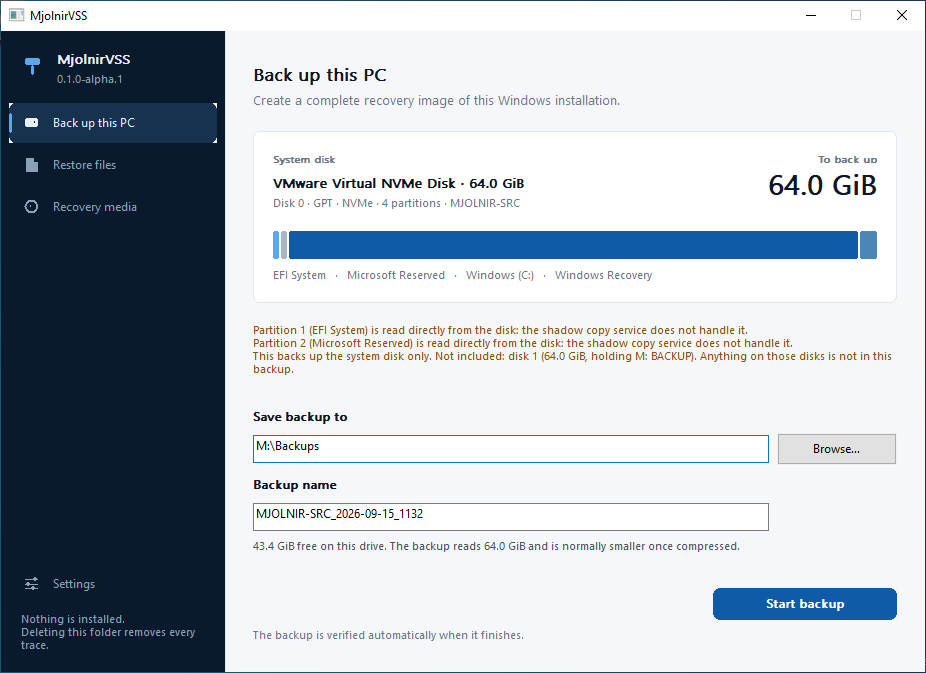
The MjolnirVSS window: a dark navigation rail with Back up this PC, Restore files, Recovery media and Settings, beside a panel showing the system disk, its partition layout and where the backup will be saved.
Runs on
Windows 10, 11, Server 2019 and 2025
Requires
UEFI firmware, GPT system disk
Installs
Nothing. No service or driver
Written in
Rust, 700+ automated tests
Licence
GPL-3.0-or-later

Why it exists

A failed system disk should cost you an afternoon, not a rebuild.

Copying files protects documents. It does not protect the machine: the installed programs, the licences, the drivers, the boot configuration and the hundred settings nobody wrote down. MjolnirVSS copies the disk those live on.

It takes a deliberately portable approach — no installed service, no driver, no scheduled task and no runtime dependency — so the tool you rely on in an emergency is a folder you can carry.

The whole machine comes back

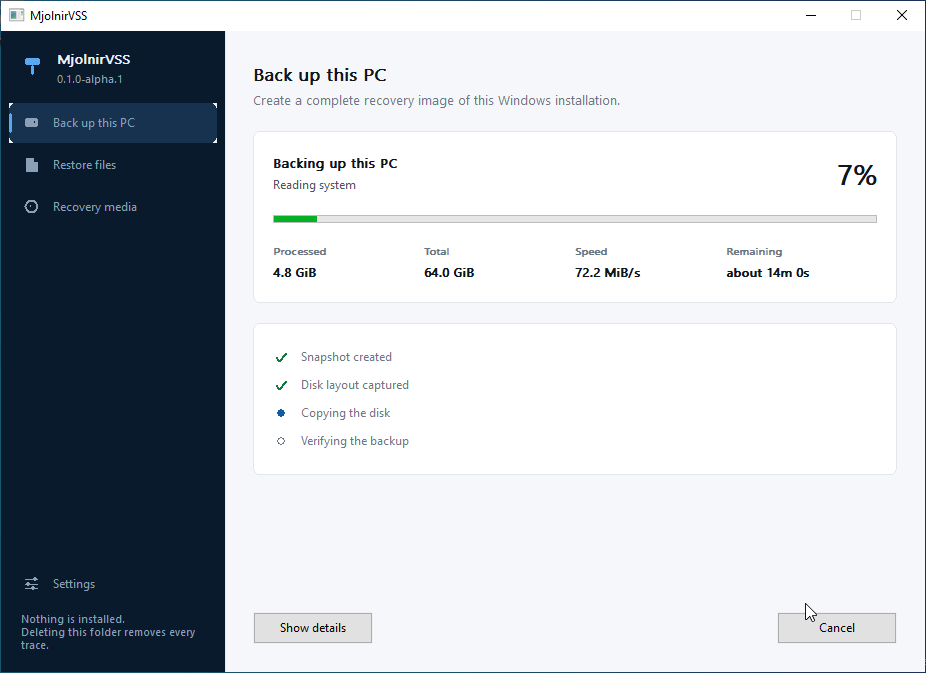
Every partition needed to start Windows is captured together: the GPT table, EFI system partition, Microsoft Reserved, Windows and the recovery partition. If one cannot be read, the backup fails rather than producing a disk that will not boot.

Nobody has to stop working

The Volume Shadow Copy Service holds the volume still for the instant it takes to open a snapshot. The image is read from that snapshot, so applications keep running and no reboot is needed.

Faults are found on backup day

Every block is read back, decompressed and compared against its BLAKE3 digest before a backup is marked complete. A damaged backup is refused by the restore wizard rather than half written.

Nothing is left on the machine

No installer, no Windows service, no filter driver, no scheduled task, no registry entries and no runtime to deploy. It runs from a USB stick, and deleting the folder removes every trace of it.

How it works

Three stages, and you only run the third one once.

  1. Snapshot the running system

    MjolnirVSS asks VSS for a shadow copy of the system volume and reads the image from that, so the contents are consistent as of one moment. It declares a copy backup, which leaves other backup software's schedules and logs alone.

  2. Image only what is in use

    NTFS is asked which clusters are allocated, and only those are read. Blocks are compressed and hashed, and can be encrypted with Argon2id and AES-256-GCM. A volume that will not report its bitmap is copied whole, and the backup records that it was.

  3. Write it onto a blank disk

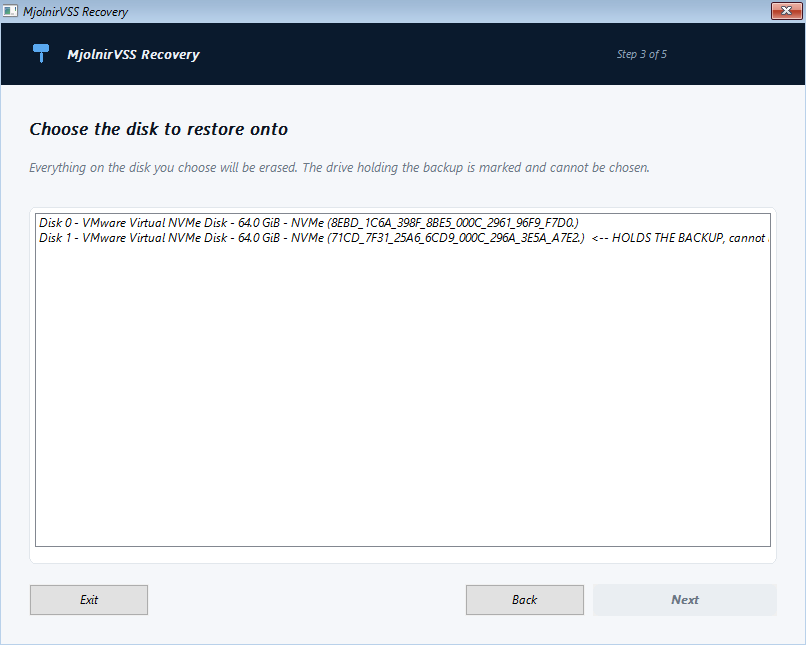
    Recovery media is built from the Windows recovery files already on the machine. Booted on the broken computer, the wizard rebuilds the partition layout, writes every partition back and repairs the UEFI boot configuration.

The program

Four things in the window, and a wizard that needs no mouse.

The day you need a backup program is not the day to start reading its manual. The same engine sits behind the window and the command line, so a bug found in one is the bug the other would have had.

The command line runs the same engine

MjolnirVSS.exe inspect                              # what would be copied
MjolnirVSS.exe backup --destination E:\Backups      # copy it
MjolnirVSS.exe verify E:\Backups\PC_2026-09-14_1015
MjolnirVSS.exe recovery-media --iso E:\Recovery.iso # make the rescue media

Every command takes --json and prints one document, failures included, with the exit code inside it. Eleven exit codes form a documented contract, so a scheduled task can tell a damaged backup from a wrong destination.

Tested end to end

Backed up, restored and booted on four Windows versions.

End-to-end backup and recovery has been validated across Windows 10, Windows 11 and Windows Server test environments. Each machine was backed up while running, verified, restored onto a blank disk from the recovery wizard, and started without intervention — matching 12 of 12 file hashes and keeping every partition's identifier, offset and size.

End to end test results
Operating systemBuildBackup sizeResult
Windows 10 22H2190454.75 GBRestored and booted
Windows 11 24H22610018.28 GBRestored and booted
Windows Server 2019177634.44 GBRestored and booted
Windows Server 2025261006.10 GBRestored and booted

Windows Server 2022 has not been tested. Sizes are what each backup occupied on disk, not the size of the source volume. Exact test environments are recorded in the testing documentation.

Early alpha

Hardware configurations vary. Test recovery in your own environment before relying on any backup solution, and keep the backup you use today until you have.

What it will not do yet

  • Run on anything but UEFI firmware with a GPT system disk
  • Capture data that lives on any disk but the system one
  • Take incremental or differential backups
  • Carry BitLocker protection through a restore

Safety

Built to refuse rather than guess.

It declares a copy backup

MjolnirVSS sets VSS_BT_COPY. In Microsoft's words a copy backup doesn't constitute a base backup for further differential backup operations, and log files should never be truncated as a result of a copy backup. In practice that means it does not move SQL Server's differential base and does not truncate Exchange's transaction logs.

The backup drive cannot be the target

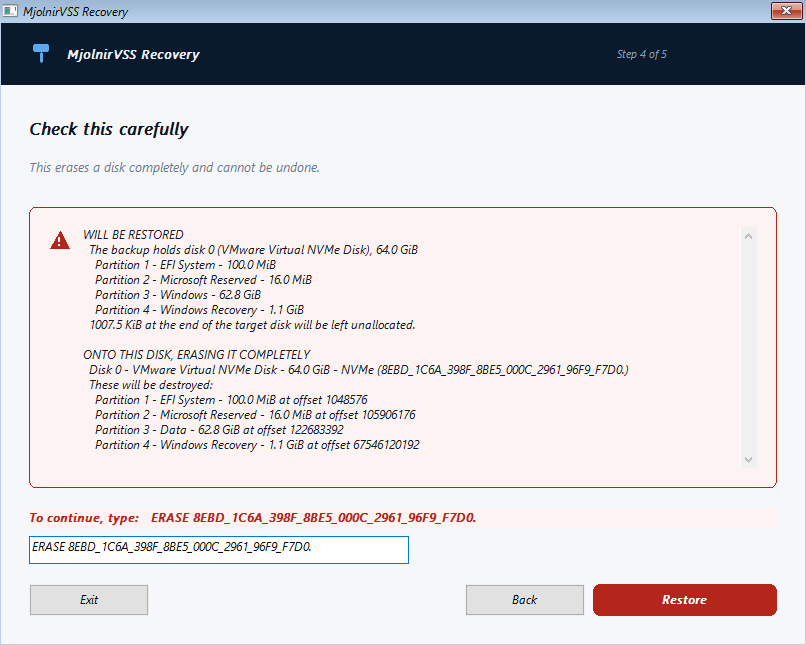
Erasing the drive holding the backup halfway through a restore would leave a machine with neither a working system nor anything to recover from. The wizard shows that drive and refuses it, rather than warning and allowing it.

Erasing takes a deliberate act

Before anything is written you are shown the target disk's number, model, serial number, size and current partitions, and you must type ERASE followed by that serial number exactly. A single keystroke is never enough.

Checks run before the destructive step

Every stored block is confirmed present before anything is erased, a disk too small for the layout is refused, and the restore stops if the disk changed size between being checked and being written.

Restore points are not promised

Removing any shadow copy can cost Windows older ones, because the space is released from the oldest end of a single pool. MjolnirVSS deletes only the snapshot it created, by identifier, and says what is at risk before it starts instead of claiming nothing will be lost.

Unsupported layouts are named, not attempted

Dynamic disks, Storage Spaces, software RAID, ReFS system volumes, legacy BIOS boot, Windows spread across several disks and untested sector sizes are each refused with an explanation of why.

Design

Open format, documented interfaces, no magic.

Nothing about a backup is hidden. The format is specified, the Windows interfaces used are the documented ones, and the whole thing is one static executable with no runtime to deploy.

Language and target
Rust, x86_64-pc-windows-msvc, C runtime linked statically. No redistributable, no .NET, no Python
Interface
Native Win32 controls, so the window works in Windows PE, follows the system theme and text size, and is usable from the keyboard and by a screen reader
Snapshots
IVssBackupComponents, declared as VSS_BT_COPY, with the snapshot released by its own identifier
Imaging
Allocated clusters only, via the NTFS volume bitmap; whole-volume fallback is recorded in the backup
Integrity
BLAKE3 over every block, checked on write and re-checkable on demand with verify
Encryption
Argon2id key derivation and AES-256-GCM from RustCrypto. Optional. Passwords are never stored and never taken as an argument
On-disk format
A folder of JSON manifests and compressed blocks, specified in enough detail to write an independent reader
Recovery environment
Windows PE built from the machine's own recovery files. Nothing belonging to Microsoft is redistributed
Automation
--json on every command, progress on standard error, eleven documented exit codes, and no prompt that can block a script
Licence
GPL-3.0-or-later. An independent clean room implementation that is not derived from any commercial backup product
Questions

The things worth asking first.

Where do I download it?

From the releases page. It is a zip holding two executables and the documentation; unpack it anywhere and run it. A SHA-256 sum is published beside it. You can also build it yourself from source with the stable Rust toolchain and the Visual Studio C++ build tools, which is four commands.

Is it safe to run against a production server?

On the VSS side, yes by design: it declares a copy backup, so it does not move SQL Server's differential base or truncate Exchange's logs. On the maturity side it is early alpha, so run it alongside your existing backup rather than instead of it until you have tested a recovery yourself.

Does it install a service or an agent?

No. There is no installer, no Windows service, no kernel filter driver, no scheduled task and no registry footprint. It uses the shadow copy service that is already part of Windows. Deleting the folder removes it.

Will it back up my data drives too?

Not today. It images the disk Windows boots from. Other disks are detected and named in the plan so you know what is not being captured, but they are not copied.

What happens to BitLocker?

An unlocked volume is read through its shadow copy, which presents it decrypted, so the backup contains readable copies of your files unless you encrypt the backup itself. A locked volume is refused. A restored disk comes back unencrypted and BitLocker has to be switched on again. No recovery key is ever read, stored or logged.

Will taking a backup destroy my restore points?

It can, and so can any program that takes a shadow copy. Windows releases shadow storage from the oldest end of one pool, so removing a new snapshot sometimes removes older ones first. MjolnirVSS deletes only its own snapshot and warns beforehand when there is something to lose. Your files are unaffected.

Can I read a backup without MjolnirVSS?

Yes. A backup is a folder of JSON manifests and compressed blocks, and the format is documented specifically so that an independent reader can be written. Nothing is hidden in a proprietary container.

Does it work on BIOS or MBR machines?

No. UEFI firmware with a GPT system disk only. A legacy BIOS installation is refused with an explanation rather than half supported.

Why the name?

MjolnirVSS got its name from my fondness for Brothers of Metal, a Swedish metal band I listen to a lot. Their Norse mythology theme led to Mjölnir — Thor's hammer — and the name stuck for a tool built around getting a Windows machine back after a hard hit. The VSS is the Volume Shadow Copy Service, which is the part of Windows that makes copying a running disk possible at all.

Read the code before you trust it with a disk.

The repository holds the source, the on-disk format, the threat model and the full record of what has been tested and how.

View on GitHub Download v0.1.0-alpha.2